Selecting the right cloud service is one of the first and most critical technical decisions for startups. This choice directly impacts not only product stability but also a company's budget and scalability. Cloud technologies can deliver 15-30% in savings, making on-premises infrastructure a less attractive investment. This guide provides a practical, step-by-step process for teams to evaluate and select a cloud provider.
Defining Your Startup's Cloud Strategy and Goals
First, clearly define the tasks your cloud infrastructure will solve. Common objectives include:
- Developing and testing new services.
- Hosting websites and applications.
- Securely storing data with automated backups.
- Providing access to the product for early customers and partners.
This initial planning stage is critical because a direct cost comparison between providers is often difficult. The reason lies in fundamental differences: each provider has its own pricing model (e.g., hourly vs. monthly), unique discount systems, and different names for essentially the same services. For instance, a service one vendor calls 'guaranteed disk space' might be labeled as 'Standard-class dedicated storage' by another, complicating analysis and requiring a deep dive into each offering.
How Cloud Server Costs Are Calculated for Startups
The cost of cloud services is directly tied to consumed resources. Greater resource demands or higher service traffic lead to higher expenses. A standard virtual server configuration includes several key components. The operating system is the foundation, with a choice between Linux and Windows Server. The data center location determines the physical placement of your data and impacts latency.
Performance is defined by the number of CPU cores and the amount of RAM. For storage, you choose the type and volume: classic Hard Disk Drives (HDDs) or faster Solid-State Drives (SSDs). Network bandwidth, dedicated IP addresses, and additional services like backups, administration, and licensing also contribute to the final price.
The choice of operating system is a strategic decision. Windows Server is often the preferred option when a project requires a graphical interface, Remote Desktop Protocol (RDP) access, or specific software only available in the Microsoft ecosystem. It's a common choice for teams without deep command-line experience. On the other hand, Linux systems like Ubuntu or Debian are favored by teams with sysadmin experience. They are drawn to Linux for its high security, stability, and cost savings, as most distributions are free.
Let's consider a practical calculation for an IT startup specializing in computer vision. The task is training deep neural networks on proprietary datasets containing tens of thousands of labeled images and video clips. The primary load comes from computational tasks during model parameter tuning and processing large data volumes.
The minimum requirements for this scenario differ drastically from standard office tasks. The key parameter in this scenario is the availability of Graphics Processing Units (GPUs). GPUs excel at the matrix operations fundamental to neural networks. Additionally, large amounts of fast RAM for loading datasets and models, as well as high-speed NVMe storage, are critically important.
On the provider's website open the pricing calculator, and choose a GPU server configuration:
- GPU instance: NVIDIA V100 (32 GB) or RTX 4090 (24 GB) for training complex models.
- CPU: 16+ modern cores for parallel data preprocessing.
- RAM: 128 GB for handling large data volumes and intermediate results.
- Storage: 1 TB NVMe SSD for storing datasets, model checkpoints, and training logs.
- OS: Linux (Ubuntu 22.04 LTS) as the standard environment for the ML stack.
- Location: A data center in Moscow to comply with Federal Law No. 152-FZ requirements and ensure minimal latency for the local development team.
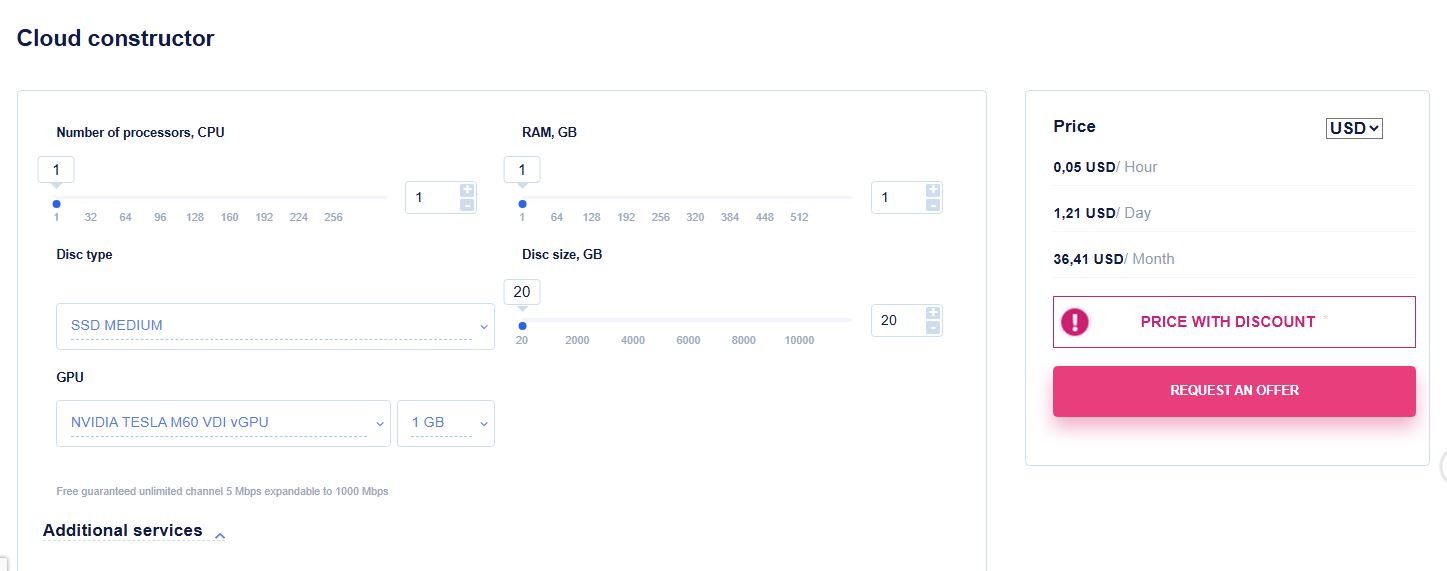
The average monthly cost for such a configuration ranges from 120,000 to 150,000 RUB. However, special startup support programs and grants can cover a significant portion of these expenses. An optimal strategy is using spot instances for model training — this can reduce costs by 3-4 times but requires readiness for potential computation interruptions. A common tactic is to start with a minimal configuration for testing, followed by gradual scaling as the project grows.
Cloud Server Pricing Models: Pay-as-you-go, Allocation, and Reservation
Cloud providers typically offer three main pricing models, each with its specifics.
- The Pay-As-You-Go model charges only for resources actually consumed, billed hourly or by the minute. Its main advantage is maximum flexibility, allowing for instant configuration changes. However, it can be more expensive in the long run. For an early-stage startup, this is often the optimal choice.
- The Allocation Pool model involves monthly payment for a fixed pool of resources. It provides predictable costs and can be more economical under stable loads but offers less flexibility, as the company pays for unused reserves.
- The Reservation Pool model is based on long-term contracts and involves payment for reserved resources regardless of their utilization level. This is the most cost-effective option but imposes long-term commitments and offers minimal flexibility.
Types of Cloud for Business: Public, Private, and Hybrid
Understanding the differences between cloud deployment models is critical for making an informed decision.A public cloud is infrastructure a provider rents out to multiple clients simultaneously. For a startup, the key advantages include:
- Rapid deployment, often in minutes instead of weeks.
-
No upfront hardware costs (CapEx).
-
Elastic scaling to match your needs.
-
Pay-as-you-go pricing, so you only pay for what you use.
The main limitations are that resources are shared among clients, which can create some dependence on the provider and raise questions about data confidentiality.
A private cloud is a dedicated infrastructure for a single company. Consider this model if your startup has:-
Exceptionally high security and confidentiality needs.
-
Specific, demanding performance requirements.
-
Significant capital available for investment.
-
Very clear, long-term scaling plans.
For most startups, the high cost, lengthy setup time, and difficulty in scaling quickly make private clouds a less practical choice.
A hybrid cloud combines elements of public and private solutions. Due to its complexity and high implementation cost, this model is rarely relevant for early-stage startups. Statistics show that while established companies often lead with hybrid solutions, most startups choose the public cloud for its flexibility and cost-effectiveness.
The Cloud Provider's SLA: What It Is and What to Look For
The Service Level Agreement (SLA) is the formal contract that defines the guaranteed level of service from your provider. You should review this document carefully when choosing a partner. Look for these key commitments in the SLA:
-
Guaranteed network uptime (usually 99.9% or higher)
-
Performance metrics for storage systems
-
Defined response times for technical support requests
-
Rules for scheduled maintenance windows
-
Financial compensation if the provider fails to meet its obligations
Do not overlook technical support. The quality of support is a critical, non-financial factor in your choice. A reliable provider should offer 24/7 assistance through multiple channels— phone, email, a ticketing system, and online chat.
Make sure the SLA clearly states how quickly the support team must respond to incidents. It's also valuable if their specialists can handle non-standard requests and proactively notify you about maintenance or issues.
Here is a practical tip: Before signing any contract, test the support team yourself. Ask a detailed technical question and judge the response for both speed and quality. This simple test can reveal a lot about what it will be like to work with them.
Additional Services and the Cloud Server Control Panel
Beyond basic virtual servers, cloud providers offer a wide array of additional services. In the beginning, it's best to focus only on what you truly need.
A simple starter setup for product development and testing might include:
-
Three virtual servers for your development, testing, and production environments.
-
An isolated virtual network for security.
-
Internal communication and management software.
-
A web server for your company site.
-
Any other project-specific software.
To save time, look for providers with an application marketplace. These are collections of pre-configured templates — like a server with WordPress already installed — that let you deploy ready-to-use software in minutes, a huge time-saver in the early stages.
Why the Control Panel Matters
For a small startup team without a dedicated system administrator, a user-friendly control panel is essential. A good panel should let you:
-
Deploy servers rapidly.
-
Choose an OS from ready-made templates.
-
Change the configuration of running servers.
-
Upload your own custom ISO images.
-
Access servers remotely.
-
Configure backups and create snapshots for quick recovery.
-
Monitor system load.
Also, check the account dashboard for valuable features like flexible payment methods, a clear billing history, tools to manage team access, and an easy way to contact support.
Comparing Control Panels
When evaluating different providers, test their control panels. You'll find that each has its own quirks. One might have a clean design and many services but feel slow with too many menus. Another might be fast and intuitive but look outdated. A third might offer a simple pricing calculator but no unified dashboard, forcing you to manage services in separate, confusing interfaces. The right choice depends on what feels most efficient for your team's workflow.
Security and Reliability: Certificates and Infrastructure
Cloud security and reliability are non-negotiable. Your provider must have the right certifications and comply with all local laws.
For operations in Russia, key requirements include:
-
A Certificate of Compliance for ISPDn (Information Systems of Personal Data).
-
A valid FSTEC license (Federal Service for Technical and Export Control).
-
Strict adherence to Federal Law No. 152-FZ "On Personal Data" which mandates that data on Russian citizens be stored within the country.
Globally recognized standards like ISO 27001 (security), ISO 9001 (quality), and PCI DSS (payment security) are also strong indicators of a trustworthy provider.
Data center infrastructure is often rated by the Tier standard (I-IV). For most startups, a Tier III facility is a solid choice. It guarantees redundancy for all critical systems, allows maintenance without downtime, and offers strong fault tolerance.
Note: While the absence of a formal Tier certification isn't necessarily a red flag, having one provides an extra layer of assurance for you as the client.
Where your servers are physically located has a direct impact on your application's speed for end-users. The closer the server is to your primary audience, the better.
Keep these two rules in mind:
-
Legal Compliance: For a Russian user base, servers must be located within Russia to comply with data localization laws.
-
Future Growth: If you plan to expand internationally, choose a provider with a geographically distributed network of data centers from the start. This will let you deploy services closer to new markets when the time comes.
Step-by-Step Guide: How to Choose a Cloud Service for a Startup
Choosing a cloud provider is a process that can be broken down into sequential steps.
- Analyze Your Needs: Define tasks, estimate required resources, identify your audience's geography, and outline security requirements.
- Create a Shortlist: Compile a list of three to four providers that best match your criteria. Study their SLAs and general terms.
- Conduct Practical Testing: Register for trial plans, test the convenience of the control panel, and assess the responsiveness of technical support.
- Calculate Costs in Detail: Use online calculators for different load scenarios, factoring in potential hidden costs like outbound traffic.
- Make an Informed Decision: Weigh not just the price but the overall quality of service. Begin work with a minimal configuration.
Startups often make similar mistakes when choosing a cloud solution.
- Over-Provisioning: Choosing an excessively powerful configuration "for future growth" leads to unjustified expenses. It's better to start with minimal, sufficient resources and scale smoothly.
- Ignoring Egress Traffic Costs: Outbound traffic can significantly impact the final bill. Carefully study the tariffs and use a CDN for static content.
- Neglecting Backups: Failing to set up automated, regular backups from day one creates enormous risks.
- Choosing Based Solely on Price: Selecting a provider only because of the lowest price, without considering support quality, reliability, and ecosystem convenience.
- Overlooking Data Localization Laws: Ignoring legal requirements for data residency can lead to serious legal issues and fines.
Conclusion
Choosing a cloud provider for a startup is about finding a balance between cost, flexibility, and reliability. The most rational strategy is to start with a public cloud using the Pay-As-You-Go model. A user-friendly control panel and high-quality technical support become critical success factors. Don't strive to build the perfect infrastructure on day one—the strength of cloud technology lies precisely in the ability to start small and scale in sync with business growth.
Key recommendations:
- Clearly define the tasks the cloud will solve.
- Start with a minimal, yet sufficient configuration.
- Choose a provider with strong, responsive technical support.
- Strictly account for all legal requirements regarding data storage and processing.
- Set up an automated backup system from the very first day.
Remember, the provider you choose at the start isn't necessarily a partner for life. Modern cloud technologies and practices allow for migration to another platform with reasonable effort as your business grows and its needs evolve.